Skip to content
Novu logoNovu

Changelog

Latest updates and improvements in the improvement category.

Follow us on X

All changelog posts

  • Provider content overrides in the Dashboard

    Save provider-native JSON on Chat and Tool workflow steps, then version and promote it with the rest of the workflow.

    Authors:
    George DjabarovVictor Yakubu
    George D., Victor Y.
    Provider content overrides in the dashboard

    Provider content overrides can now be configured directly in the Novu Dashboard. Use them when a workflow needs fields from a provider's native API that the shared step editor does not expose, such as Slack Block Kit, WhatsApp templates, or PagerDuty incident fields.

    Previously, these payloads had to be added to every trigger() call in application code. You can now save the JSON once on the workflow step. It applies to every trigger and moves from development to production with the workflow.

    Keep provider-native content with the workflow

    Open a Chat or Tool step and select a connected provider from the content source dropdown. Provider tabs only appear when that provider has an active integration in the current environment.

    The override is stored as a JSON object on the step. It supports Liquid variables, so the payload can still use workflow and subscriber data:

    {
      "blocks": [
        {
          "type": "section",
          "text": {
            "type": "mrkdwn",
            "text": "Deploy *{{payload.status}}* for {{subscriber.firstName}}"
          }
        },
        {
          "type": "actions",
          "elements": [
            {
              "type": "button",
              "text": { "type": "plain_text", "text": "View run" },
              "url": "{{payload.runUrl}}"
            }
          ]
        }
      ]
    }

    The Dashboard also shows a preview of the merged payload before you save the workflow.

    Get validation where a provider schema is available

    Schema-backed editors help you catch malformed provider payloads before delivery. Slack overrides include autocomplete and validation against supported chat.postMessage fields, including nested Block Kit elements. The editor also links to Slack's Block Kit Builder.

    WhatsApp Business overrides provide autocomplete and validation for message shapes such as templates, interactive messages, media, and text. The same override interface is available for Tool providers, including PagerDuty, Opsgenie, Grafana, and Tool Webhook.

    When a provider does not have a schema-backed editor, the Dashboard provides a free-form JSON field with a warning and a link to the provider's documentation. Novu passes that object to the provider, so test the workflow with a real trigger before relying on it.

    Combine default content and overrides predictably

    The shared step body remains the default content. Novu merges the saved override into the provider request. If the override omits the provider's primary content field, such as text for Slack or text.body for WhatsApp, Novu fills it from the rendered step body.

    Overrides follow this precedence order:

    1. Dashboard override saved on the step.
    2. Workflow-level provider override passed at trigger time.
    3. Step-level provider override passed at trigger time.

    The higher-priority value wins when the same field appears at multiple levels. Arrays replace the lower-priority array as a whole. They are not merged by index.

    Some Slack chat.postMessage fields do not apply when the integration delivers through an incoming webhook. Check the Slack setup guide before relying on fields such as thread or sender metadata.

    Use Rich Chat for shared content and overrides for provider-specific fields

    The Rich Chat editor and provider content overrides work together. Use the block editor when you want to create one structured message and let Novu render it for each connected chat provider. Use an override when one provider needs its own JSON format or a field outside the shared card model.

    Provider content overrides are available for Tool steps and are rolling out gradually for Chat steps. If the provider dropdown does not appear on a Chat step yet, trigger-time provider overrides continue to work.

    Read the Chat provider content overrides overview, configure Slack overrides in the Dashboard, or review the provider override precedence rules.

  • Novu MCP OAuth

    Connect Cursor, Claude Code, ChatGPT, and other MCP clients to Novu with OAuth - no API key to copy, your organization picked up automatically on sign-in.

    Author:Himanshu Garg
    Himanshu Garg
    Novu MCP OAuth sign-in — one-time consent to let an AI client act on your Novu workspace

    The Novu MCP Server now supports OAuth for Novu Cloud. Point your AI client at the MCP URL, approve the sign-in prompt on first use, and you're connected — no secret key to copy, paste, or rotate.

    OAuth is the recommended path for interactive clients like Cursor, VS Code, Claude Code, and ChatGPT. API keys still work as a fallback for clients without remote OAuth, autonomous agents, and self-hosted Novu.

    Connect in one step

    Add the MCP URL for your region and save. Your client handles the rest — it prompts you to sign in to Novu the first time it calls a tool.

    {
      "mcpServers": {
        "novu": {
          "url": "https://mcp.novu.co/"
        }
      }
    }

    Use https://mcp.novu.co/ for US and https://eu.mcp.novu.co/ for EU — match the region of your Novu dashboard.

    Available on every Novu Cloud plan. Read the MCP connection guide.

  • Account Security Upgrades: Passkeys, Smarter Client Trust, zxcvbn, Turnstile

    Sign in with a passkey, skip Client Trust when 2FA is on, get real password-strength scoring at signup, and run into bot challenges only when traffic looks suspicious.

    Author:Dima Grossman
    Dima Grossman

    Four account-security improvements ship together today: passkey login, Client Trust deferring to 2FA, zxcvbn-ts password scoring, and a smart CAPTCHA on sign-up.

    Existing sessions are unaffected.

    Passkey Login

    Passkeys are now a supported authentication method for Novu accounts.

    Sign up with email and password or SSO as usual, then add a passkey from Account settings → Security.

    Your platform authenticator (Touch ID, Windows Hello, a hardware security key or a password manager like 1Password or iCloud Keychain) handles the rest.

    On your next sign-in, pick Sign in with passkey.

    Passkeys are built on WebAuthn. The private key never leaves your device, so there's nothing phishable for an attacker to capture on our side.

    You can register up to 10 passkeys per account, and they stack alongside your password and 2FA. Passkeys are an additional method, not a replacement.

    Client Trust Now Defers to 2FA

    Client Trust is our defense against credential stuffing: when someone signs in with a valid password from a new device, we send a one-time code to their email or phone.

    The catch was that this fired even on accounts with 2FA already enabled. Signing in from a new laptop meant two prompts: enter your TOTP code, then approve the new device.

    That's now collapsed into the regular MFA flow.

    If you have 2FA configured (TOTP, SMS or backup codes), Client Trust skips automatically. Your second factor already covers the new device.

    If you don't have 2FA enabled, behavior is unchanged: new devices still require a verification code by email or phone.

    This only applies to password sign-ins. Passkeys, OAuth and email links bypass Client Trust entirely.

    If you've been meaning to turn on 2FA, this is the nudge.

    Stronger Password Feedback via zxcvbn

    Password strength at signup, change and reset is now scored with zxcvbn-ts, the OWASP-recommended library for measuring real password entropy rather than pattern-matching "8 characters, one number, one symbol."

    You'll see live strength feedback as you type, and a prompt when a password technically meets the basic rules but is still weak (Password1!, qwerty123, dictionary words with predictable substitutions).

    This sits on top of our existing NIST-based minimum requirements.

    Smarter Bot Protection on Sign-up

    Sign-up is where bots show up first.

    We've moved off the old invisible CAPTCHA and onto a smart variant that uses CDN-level signals to decide whether a sign-up attempt looks suspicious.

    If it does, the user gets a quick interactive challenge (typically a checkbox). If it doesn't, which is most of the time, the challenge stays out of the way.

    Less friction for real users, more for the scripted ones.

  • Throttle Step

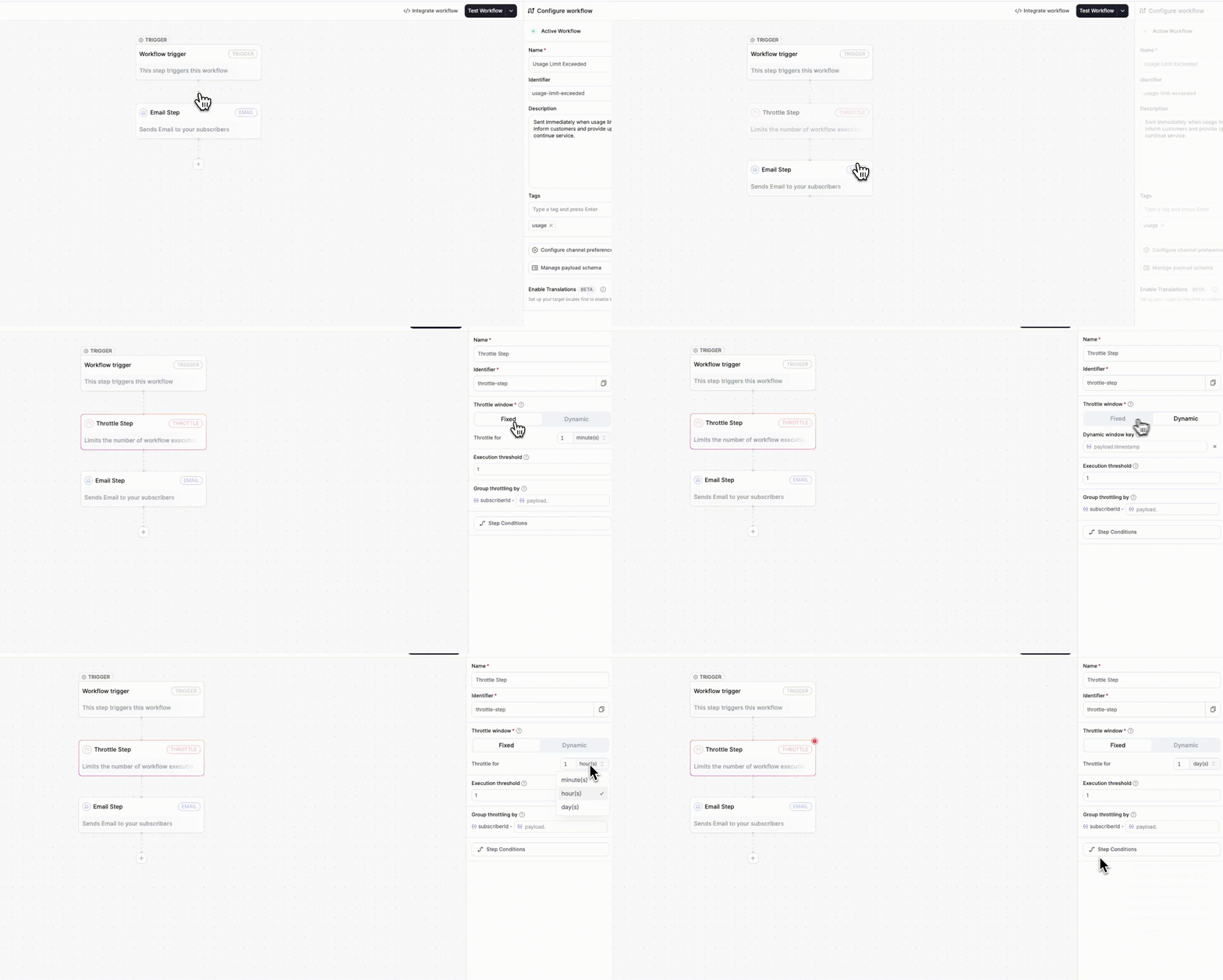
    The new Throttle Step allows you to limit the frequency of a workflow execution for each subscriber within a specified time window. This will prevent duplicate or excessive notifications across all channels. You can use fixed or dynamic windows. Perfect for managing high-frequency alerts, cron jobs, or multi-project notifications.

    Author:Dima Grossman
    Dima Grossman
    Throttle Step

    The new Throttle step in the Novu workflow editor allows you to limit the number of notifications a subscriber receives within a specified time frame, ensuring they receive the right amount, neither too many nor too few.

    When a trigger fires repeatedly (e.g., from cron jobs or high-frequency alerts), throttling ensures that subscribers don’t receive duplicate messages across any channel.

    Throttle Step

    You can now:

    • Configure throttling directly in the workflow editor.
    • Define Fixed or Dynamic throttle windows.
    • Limit executions by subscriberId or add a secondary grouping key from your payload (e.g., payload.projectId).
    • Prevent notifications from executing beyond your defined threshold (even for critical workflows).
    • Transparently control frequency across all channels (email, in-app, SMS, chat, push).

    Configuration options:

    • Fixed window: Set a predefined duration (e.g., “1 per hour”) with an execution threshold.
    • Dynamic window: Define flexible time ranges using trigger payloads (payload.throttleUntil or payload.customWindow).
    • Group throttling by: Combine subscriber and payload-level keys for granular control (e.g., per project or account).

    Learn more by visiting the Throttle Step documentation →

    Improvements (3)
    • Schemas now support null values for optional fields in workflows, ensuring executions no longer fail when data is intentionally unset.

    • Add support for excluding specific subscribers from topic-triggered workflow fanouts using an optional exclude array.

    • Add support for defining a custom display order of workflows in the Preferences UI, allowing prioritized workflows to appear at the top.

    Fixes (1)
    • fix(dashboard-ui): Unify and align all dashboard tables (Workflows, Subscribers, Topics, Topic Subscriptions) using the new OriginUI table component for consistent layout, pagination, and record visibility.